
Git and version control best practices offer developers a powerful way to manage their code efficiently and collaboratively. As the backbone of modern development workflows, mastering these practices can significantly streamline the process of coding and collaboration among teams.
Understanding the essential functions of Git, from setting up a repository to making meaningful commits, is crucial. With the right approach to version control, you can ensure the integrity of your projects and maintain clear communication within your team.
Git Basics and Setup
Git is an essential tool in modern software development, serving as a version control system that tracks changes in source code throughout various stages of development. By utilizing Git, teams can collaborate more effectively, maintain a history of their changes, and easily revert to previous versions if necessary. The importance of Git cannot be overstated; it not only enhances productivity but also ensures code integrity and facilitates team communication.Setting up a Git repository is straightforward and crucial for managing your projects effectively.
Here’s a step-by-step guide to get started with Git:
Setting Up a Git Repository
To establish a new Git repository, follow these steps:
1. Install Git
First, ensure that Git is installed on your system. You can download it from the official Git website. For most operating systems, the installation process is user-friendly and straightforward.
2. Open Command Line Interface
After installation, launch your terminal (on macOS or Linux) or command prompt (on Windows).
3. Create a New Directory
Navigate to the folder where you want your Git repository to reside. You can create a new directory with the command: “`bash mkdir my-project cd my-project “`
4. Initialize Git
Once in the desired directory, initialize a new Git repository with: “`bash git init “` This command creates a new .git subdirectory, which contains all the necessary files and data for your version control system.
5. Add Files
Add files to your Git repository using the command: “`bash git add . “` This stage prepares the files to be committed.
6. Commit Changes
Finally, commit your changes with a descriptive message: “`bash git commit -m “Initial commit” “`This process sets up a basic Git repository, allowing you to start tracking changes to your project’s files.
Common Git Commands and Their Functions
Understanding Git commands is vital for effective version control. Below are some of the most commonly used commands along with their functions:
git clone
This command creates a copy of an existing Git repository. It’s often used to copy a project from a remote source. “`bash git clone “`
git status
This command displays the current state of the working directory and staging area. It shows which changes have been staged, which haven’t, and which files aren’t being tracked. “`bash git status “`
git push
This command uploads local repository changes to a remote repository. It’s essential for sharing your work with others. “`bash git push origin main “`
git pull
This command fetches and integrates changes from a remote repository into your current branch. “`bash git pull origin main “`
git branch
This command lists all branches in your repository, and it can also create, delete, or rename branches. “`bash git branch “`
git checkout
This command switches between branches or restores working tree files. It’s critical for navigating your project. “`bash git checkout “`
git merge
This command integrates changes from one branch into another, allowing for collaborative development without conflicts. “`bash git merge “`Understanding these commands provides a solid foundation for using Git effectively and allows developers to manage their projects with confidence.
Version Control Best Practices
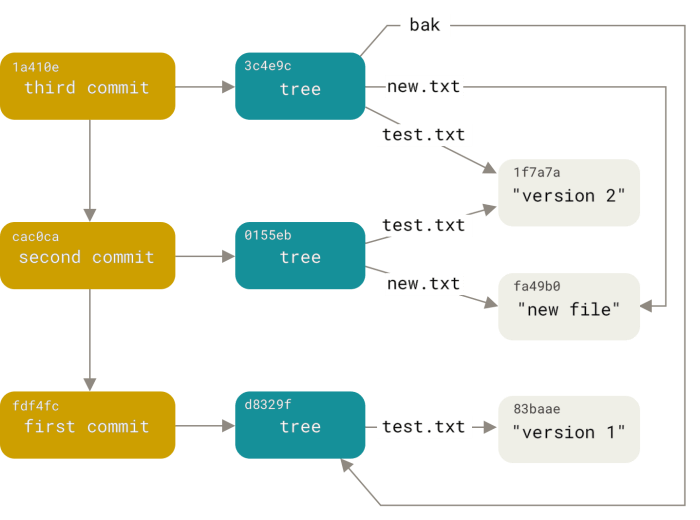
In the world of software development, mastering version control is essential to streamline collaboration and maintain code integrity. This section delves into key practices that enhance the effectiveness of Git, helping teams manage their projects more efficiently. From committing changes to managing branches, understanding these best practices fosters a more organized workflow.
Committing Early and Often
Committing changes frequently is a crucial practice in Git that can significantly improve project management and reduce the potential for conflicts. By making smaller, incremental commits, developers can track their progress more effectively while providing a clearer history of changes.Here are the benefits of committing early and often:
- Improved Tracking: Smaller commits allow for easier identification of what changes were made and when, making code reviews and debugging simpler.
- Reduced Conflict Risks: Frequent commits minimize the risk of merge conflicts, as changes are integrated into the main branch regularly, facilitating smoother teamwork.
- Enhanced Revert Options: If a bug is introduced, reverting to a previous commit is more manageable when changes are clearly delineated.
Meaningful Commit Messages
Crafting meaningful commit messages is fundamental to effective version control. A well-written commit message communicates the purpose of the changes clearly, aiding both current collaborators and future developers who may revisit the project.Key elements of a strong commit message include:
- Descriptive Summaries: Start with a brief, imperative summary of the changes made, usually capped at 50 characters.
- Contextual Information: Include additional details in the body of the message (if necessary) that explain the “why” behind the changes, which can be up to 72 characters per line.
- Reference Issues or Tickets: If applicable, reference any related issues or tickets to provide context and expedite searchability.
“A good commit message is often as important as the code itself.”
Branch Management in Collaborative Projects
Effective branch management is crucial in collaborative projects, allowing multiple developers to work simultaneously without stepping on each other’s toes. Organizing branches thoughtfully can significantly enhance the workflow and minimize integration challenges.Best practices for branch management encompass:
- Use Feature Branches: Create a separate branch for each feature or bug fix. This isolates work and allows for focused development without affecting the main codebase.
- Follow a Naming Convention: Use clear, descriptive names for branches (e.g., `feature/login-auth` or `bugfix/issue-123`) to facilitate easy identification and collaboration.
- Regularly Sync with Main Branch: Frequently merge changes from the main branch into feature branches to keep them updated and reduce the potential for conflicts during integration.
- Clean Up Merged Branches: After a branch has been merged, delete it to keep the repository tidy and manageable.
Integrating Git with Other Technologies
Integrating Git with various technologies enhances the development workflow, creating seamless interactions between version control and other tools. This integration is vital for modern web development, where multiple platforms and services can work together to streamline processes.
Integration with Web Hosting and Domain Management
Integrating Git with web hosting and domain management is essential for automating deployment and ensuring consistency across different environments. Many web hosting services now support Git, allowing developers to push changes directly from their local repositories to the server. Key methods of integration include:
- Git Hooks: These are scripts triggered by Git commands, which can be used to automatically deploy code to a server after a push to a repository. For example, a post-receive hook can be set up to deploy the latest code to a live environment upon receiving changes.
- Continuous Deployment Services: Tools like Heroku, Vercel, and Netlify allow developers to connect their Git repositories. Changes pushed to specific branches can automatically trigger deployments, reducing the need for manual uploads.
- Web Hosting Control Panels: Platforms like cPanel and Plesk offer integration with Git, enabling users to clone repositories directly onto their hosting environment, simplifying the deployment process.
Role of Git in Web Design and Development Workflows
Git plays a crucial role in modern web design and development workflows. Its branching and merging capabilities facilitate collaboration among team members, enabling multiple design iterations without disrupting the main project.The importance of Git in these workflows includes:
- Version Control: Designers and developers can track changes, revert to previous versions, and manage multiple versions of a website or application efficiently.
- Collaboration: Git allows multiple team members to work on different features simultaneously, merging their changes into a cohesive final product without conflicts.
- Feedback and Review: Utilizing pull requests enables teams to review code and design changes before integration, ensuring quality and adherence to project standards.
Framework for Using Git in Programming Alongside Other Tools
Establishing a framework for using Git in programming alongside other tools is vital for maximizing productivity and streamlining the development process. A well-defined workflow can enhance collaboration and reduce errors.Key components of this framework include:
- Integrating with IDEs: Many integrated development environments (IDEs), such as Visual Studio Code and IntelliJ IDEA, offer built-in Git support, allowing developers to manage version control directly within their coding environment.
- Use of CI/CD Tools: Continuous Integration and Continuous Deployment (CI/CD) tools like Jenkins, CircleCI, and GitHub Actions can automate testing and deployment processes, ensuring that code changes are validated before being integrated into the main branch.
- Collaboration Tools: Incorporating platforms like Slack or Microsoft Teams can facilitate real-time communication and issue tracking, allowing developers to notify team members of changes and updates instantly.
Concluding Remarks
In summary, adopting Git and version control best practices not only enhances your coding efficiency but also fosters a collaborative environment where everyone can contribute seamlessly. By committing frequently and using clear messaging, you can safeguard your project’s history and facilitate smoother teamwork.
Quick FAQs
What is the best way to write commit messages?
Commit messages should be concise, clear, and descriptive, ideally following a format that explains the ‘what’ and ‘why’ of the changes made.
How often should I commit my code?
It’s best to commit your code early and often, ideally after completing a small task or feature, to keep your changes manageable and easy to track.
What are branches and why are they important?
Branches allow you to work on different features or fixes simultaneously without affecting the main codebase, making it easier to manage changes and collaborate with others.
Can I use Git for non-code projects?
Yes, Git can be used to track changes in any type of files, making it suitable for documentation, design assets, and other non-code projects.
What are some common mistakes to avoid with Git?
Common mistakes include neglecting to write meaningful commit messages, not using branches effectively, and failing to pull updates from the main repository before making changes.


